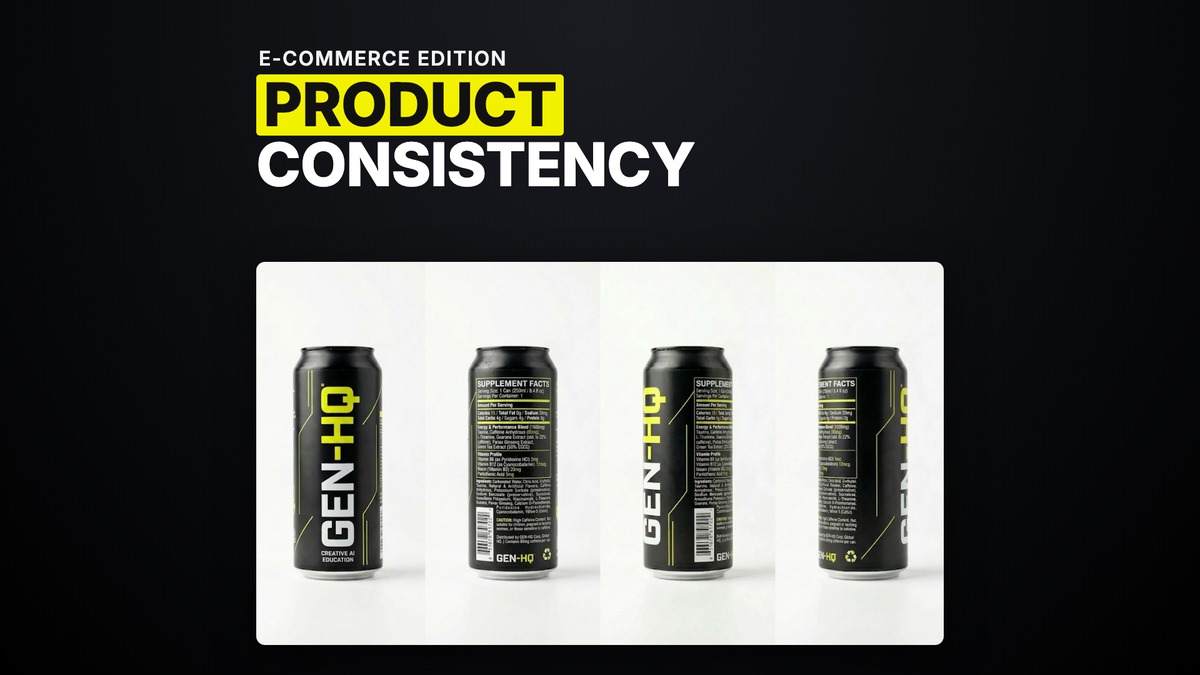
Product Consistency and Scale in AI Images and Video (E-commerce Edition)
Run an e-commerce product through enough shots and it will drift on you in three separate ways. It changes size shot to shot. The label or on-product text turns to soup the moment the camera moves back. And a small object reads as a completely different object because nothing in the frame tells the model how big it is actually meant to be. Three different drifts, three different fixes.
Size drift, the can that changes height mid-ad
I reviewed an ad for an energy drink once where the can was a visibly different size in almost every shot. The diagnosis was blunt, nobody had told the model how big the can actually was. The fix, one I have used again since on a supplement formula, is to put the object's real dimensions on the object sheet itself and then repeat those dimensions in the generation prompt. Say it twice, once on the reference and once in the words. If a kid is holding the can in one shot and an adult in another, the model needs the actual size written down somewhere, because it will not infer it from context alone.
When dimensions on the sheet and in the prompt are not enough on their own, my backup move is to place the product next to something the model already has enormous training data on, something genuinely Googleable, a Coca-Cola bottle is my go-to example. A well-known reference object anchors the scale in a way an abstract number in a prompt sometimes cannot.
The same drift shows up on characters, not just products. I have seen a pamphlet-sized book turn into what looked like a giant dictionary in random shots, despite a proper character sheet. The fix is the character-scale version of the same trick, a height-annotated character sheet, built in GPT Image 2, for anything where height genuinely matters to the shot, a basketball player who has to read as tall, a giant, a tiny figure. If height is not load-bearing to the story, skip the extra work. If it is, and I have seen six to seven foot characters standing next to a twenty-five metre alien to prove exactly why it matters, put the number on the sheet.
Label and geometry drift, the text that turns to soup
The second drift is what happens to on-product text and labels the moment the camera pulls back or the angle changes. I have seen on-screen text come back as plain gibberish, unreadable once you looked closely. The fix for that specific case is to take a screenshot of the actual text you want on screen, reference it directly in the prompt on Seedance 2.0, and animate just that three to four second bit at high resolution rather than the whole shot. Small text needs resolution it will not get by default, so isolate the moment that needs to be sharp and spend the render budget only there.
For the broader problem of keeping a label or a product's printed text consistent across many shots, the model I keep coming back to for anything with text on it is GPT Image 2, because it handles text and spatial understanding better than the alternatives. My method, once someone is struggling to keep a product's printed text intact across angles, is to build the object's first frame in GPT Image 2 from three different sides rather than one, so the text has already been locked from multiple angles before the video model ever touches it.
Object sheets are not something every prop needs. My rule is that a dedicated object sheet earns its place only when the object recurs across different angles, or when plain prompting keeps failing on it. A prop that shows up once does not need one, that is a job you can hand to whichever image model you already have open.
The discipline underneath all three fixes
Every one of these drifts comes from the same gap. The model was never told, in a form it can actually hold onto, what the object is supposed to look like at a given size, from a distance, or with text intact. A dedicated object reference sheet is the specification, not decoration, and video models have real limits on rendering text that no amount of clever wording gets around on its own. Put the dimensions where the model can read them twice. Anchor scale against something the model already understands at true size. Lock text from multiple angles before you touch a single frame of video. None of that is exotic. It is the same discipline a real production applies to a hero prop, just written down for a model instead of handed to a props department.
Common questions
Why does my product change size between shots in AI video?
Because the model was never given the object's real dimensions. Put the measurements on the object sheet and repeat them in the generation prompt, and if that is not enough, place the product next to a well-known object of known size, like a Coca-Cola bottle, to anchor the scale.
Why does on-product text or a label turn into gibberish in AI video?
Small text needs resolution it will not get by default. Reference a screenshot of the actual text you want and animate just that few seconds at high resolution, rather than the whole shot.
Which AI image model is best for products with text on them?
GPT Image 2, as of August 2026, handles on-product text and spatial understanding better than the alternatives I have tested. Build the object's reference from three sides in GPT Image 2 before it goes into the video model.
Do I need a reference sheet for every product or prop in a shot?
No. A dedicated object sheet earns its place when the object recurs across different angles or when plain prompting keeps failing on it. A prop that appears once does not need one.
Want the full method and the community that runs it every week? Join GenHQ.
