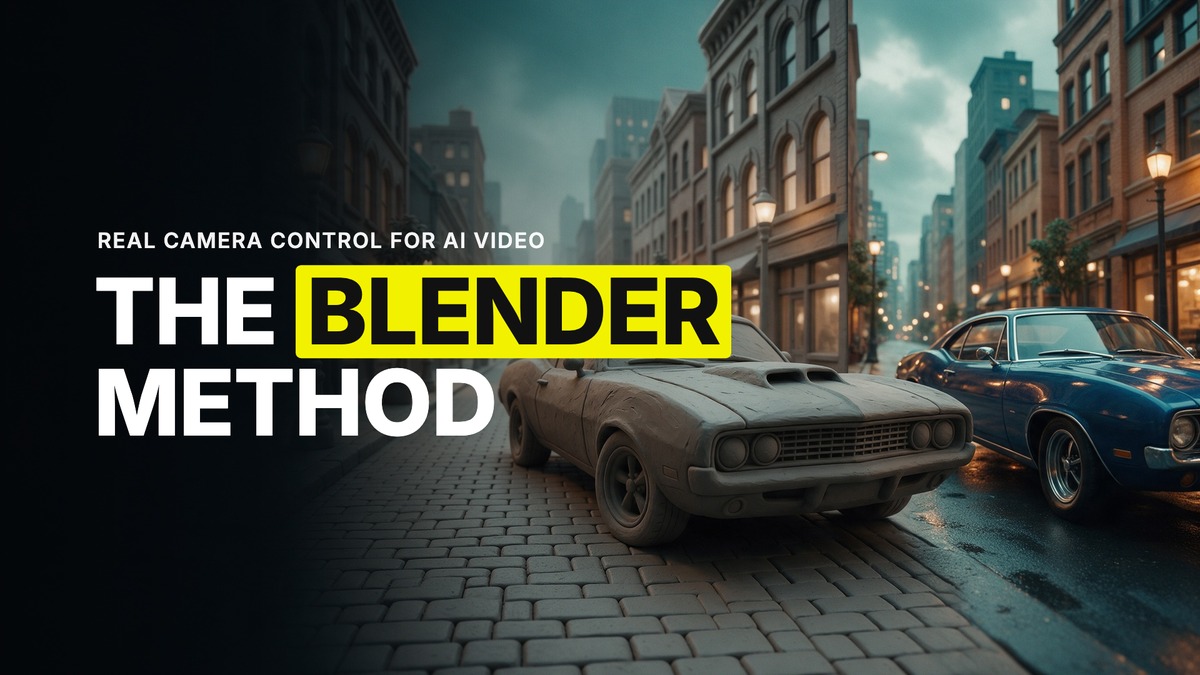
The Blender Method: Real Camera Control for AI Video
You cannot describe every camera move in words, and Seedance cannot read your mind. A car chase with two vehicles swapping lanes at speed, a drone move that threads through a doorway, a fight scene where three people need to hit their marks at the same second. Try to type that out and you get a generic result, because the model is guessing at geography you never gave it.
The fix I use is what I call the Blender method, and it is probably the best thing that has happened for creatives working with AI video. Not because it makes prettier pictures. Because it hands Seedance something no prompt ever could, an exact, physical camera path.
What the method actually is
You block out the scene in Blender. Not a finished render, not textured, not lit properly. Simple grey shapes standing in for your car, your building, your characters, placed where they need to be. Then you animate the camera through that block-out and capture the move. That capture, the camera move only, gets uploaded to Seedance 2.5 as a reference.
Seedance follows the camera. It does not follow the grey blocks as your subject. So the car chase you built in ten flat rectangles comes back as an actual car chase, with your framing, your timing, your speed, because the path was never left to chance.
Why grey blocks are usually enough
One viral reel made the point better than any explanation could. Someone had fully modelled a Dodge Charger and rendered the whole block on a city street in one flat grey clay material, no colour, no texture, nothing dressed. Fed into Seedance 2.5, it came back as a Ford Mustang.
That is not a failure. That is the method working exactly as it should. The detail in that clay pass locked the proportions, the wheel placement, the traffic around it and the camera path. It did not lock the car itself, because the car was never the point of the reference, the geometry and the motion were.
Worth saying plainly, because it trips people up: the heavily detailed clay renders you see posted, the ones that look like a proper CG studio job, are mostly downloaded models from places like BlenderKit or Sketchfab dropped into a scene and given one grey material. That is not sculpting talent, it is asset placement. My own rule has stayed consistent. That level of detail is not needed most of the time. Simple blocks in an open space, camera captured, location and character references added on top in Seedance, gets you there faster for the vast majority of shots.
When it earns its setup time
Use it when you want a camera move you cannot describe in words. A car chase is the standard example. So is anything with tight, choreographed spatial relationships, multiple characters or vehicles that have to be in a specific place at a specific frame, a camera that has to travel through a space in a way a sentence cannot capture.
I ran into this directly on a car chase project, a four kilometre road built in Blender for around 150 shots, two cars, a driver and passenger who kept swapping seats between generations no matter how clearly the prompt named who sat where. The fix was to lean harder into the block-out rather than fight it in text, use an object sheet for the car and character sheets for both people alongside the environment reference, and reserve Blender specifically for the shots where the camera itself needed to be exact. For the close-ups, the tyres, the headlights, the wide drone passes, you do not need Blender at all. Building every single shot that way is time-consuming for no gain, because Seedance handles those on references and a good prompt just fine.
You do not need to be a 3D artist
This is the part that stops people before they start, and it should not. You do not need to know Blender well for this to work, maybe five percent of it. Common sense gets you through the rest. Some of the creators I work with have never opened Blender's interface themselves. They have described what they want to Claude or to ChatGPT's Astra agent and had it build the block-out and set the camera for them, then just captured the output.
Blender itself is free, and it runs on a decent consumer GPU. You do not need a render farm or a film school. If your machine is older or lower powered, keep the heavy 3D work off your working device and do the rest of your pipeline, organising, generating images, the parts that do not need a graphics card, on whatever you have.
The trade-off, honestly
It is slower than writing a prompt. Blocking out a scene and animating a camera through it takes real time even when Claude or Astra is doing the building for you, and for anything with a lot of moving parts, cars swapping positions, characters interacting with objects in a set order, it can still drift once it leaves Blender and enters Seedance. Play tricks with the shot list rather than trying to force total accuracy through every frame. A close-up or a drone pass covers for a transition that would otherwise fight the model.
The honest verdict is that most of your project does not need this. Reserve it for the handful of shots in every job where the camera path is the whole idea and no sentence will get you there.
Common questions
Do I need to know 3D modelling to use the Blender method for AI video?
No. Maybe five percent Blender knowledge is enough. Simple grey blocks standing in for your subjects work, and you can describe what you want to Claude or Astra and have it build the block-out for you.
Does the detail in my Blender scene control what the final video looks like?
No, and this is the part people get wrong. It locks proportions, layout, timing and the camera path, not the subject's appearance. A detailed clay render of one car has come back in Seedance 2.5 as a completely different car. Your character and location references handle appearance, the block-out handles motion and space.
When should I actually use this instead of just prompting?
When you need a camera move or a spatial relationship you cannot describe in words, a car chase, a choreographed multi-person scene, a camera that has to travel through a space in an exact way. For most single shots, character and location references in Seedance plus a good prompt get there faster.
What computer do I need to run Blender?
Blender is free and runs on a decent consumer GPU. You do not need specialist hardware. If your machine is limited, keep the 3D work off it and do the rest of your workflow, organising, image generation, elsewhere.
Want the full method and the community that runs it every week? Join GenHQ.
